
 IEEE
IEEE Web of Science
Single-Node Graph
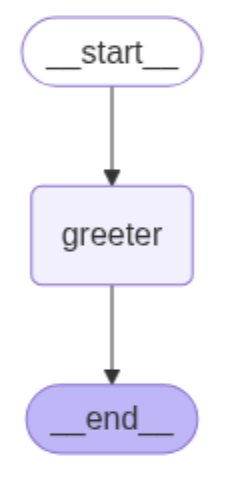
Figure 1 illustrates the overall flow of a single-node graph in LangGraph,
consisting of a start state, a node (named greeter), and an end state. The
start state is connected to the node via a directed edge (transition), and
similarly, the node is connected to the end state through another directed
edge [1].
Single Input
In this example, the primary objective is to receive the user's first name as input and display the message: "Hey {user’s first name}, how is your day going?" In this regard, we first need to create a shared data structure to keep track of information as the application runs. The defined structure, AgentState, records the system's state [1].

Then, the greeter node is defined as a function that receives the user's first name as input and incorporates it into the state information stored in AgentState. The function then returns the updated state [1].

The next step involves constructing the graph. To begin, we initialize an empty graph in LangGraph, specifying its input type as state (AgentState). We then add the greeter node to the graph, followed by connecting it to both the start and end states. Finally, we compile the graph and store it in a variable for subsequent execution [1].
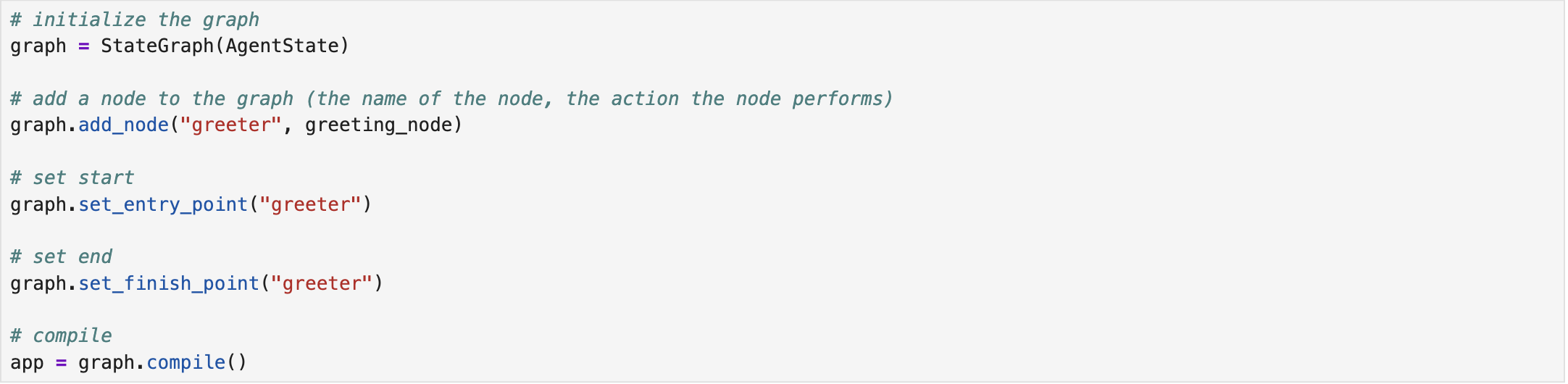
Lastly, we invoke the compiled graph by passing an example first name to that. The results indicate that the designed graph-based system could successfully meet the intended objective [1]. The complete implementation script is available on Single-Node Graph - Single Input.

Multiple Inputs
We repeat the same steps for the multi-input scenario, in which a list of values is provided to the system alongside the user's first name. The system then returns a message that incorporates both the user's first name and the sum of the values. Compared to the single-input scenario, the AgentState in the multi-input scenario handles two types of input data: the user's name as a string and the values as a list of integers [1].

In the multi-input scenario, the node is referred to as processor. The inputs are passed to this node, which calculates the sum of the values, constructs a message incorporating both the user's name and the calculated sum, and updates the state accordingly [1].

The system is then compiled and executed with the user-provided inputs. The results confirm that the system successfully achieves the intended functionality [1]. The complete implementation script is available on Single-Node Graph - Multiple Inputs.

References
[1] freeCodeCamp.org, https://youtu.be/jGg_1h0qzaM?si=69DsFmR2TMN259HC.